Setting Up Your Startup Office Space: The Complete Guide for Modern Entrepreneurs
My observations this year underscore a tectonic shift in the startup office space paradigm. Recent studies illuminate a compelling trend: 73% of thriving startups are strategically reimagining their workspaces to accommodate hybrid operational models while actively cultivating a robust company culture. This guide is my response to this evolution, meticulously designed to empower you to navigate the intricacies of constructing an impactful office environment that fuels innovation and amplifies productivity.
As we embark on this journey of exploration together, you shall gain insights into architecting a workspace that is not only functionally effective today but also possesses the scalability and sustainability crucial for long-term growth. Whether you are initiating your venture or scaling existing operations, the principles and strategies articulated here will enable you to make informed, strategic decisions regarding your startup’s office space imperatives.
Strategic Location Planning for Tech Hubs
Selecting the optimal location for your startup is a pivotal strategic decision that can significantly influence your company’s trajectory. While established technological epicenters like San Francisco and New York City maintain their dominance, emerging corridors across the United States present compelling alternatives for tech companies seeking strategic advantages.
Primary Tech Hub Cost Comparison
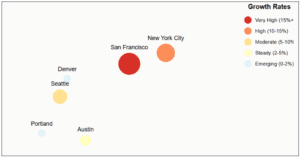
It is advisable to compare the costs and benefits of establishing a tech hub in four different US locations: San Francisco, New York City, Long Beach, and El Segundo. The comparison focuses on key factors influencing location decisions for tech startups and established companies.
Key Factors Analyzed:
- Office Rent/sq ft/year: This represents the annual cost of leasing office space per square foot. San Francisco and New York City exhibit significantly higher costs compared to Long Beach and El Segundo.
- Utility Costs/month: This shows the monthly utility expenses per square foot, again highlighting the considerably lower costs in Long Beach and El Segundo compared to the established tech hubs.
- Tech Talent Pool: This assesses the availability of skilled tech professionals in each location. San Francisco and New York City possess a very large and highly skilled talent pool, while Long Beach offers a medium-sized pool and El Segundo a high-sized pool.
- Tax Incentives: This indicates the level of government support and tax benefits offered to tech companies in each location. Long Beach and El Segundo both offer high levels of tax incentives, unlike the more limited incentives available in San Francisco and New York City.
| Cost Factor | San Francisco | New York City | Long Beach | El Segundo |
| Office Rent/sq ft/year | $92.50 | $85.20 | $42.30 | $48.60 |
| Utility Costs/month | $3.80/sq ft | $3.50/sq ft | $2.20/sq ft | $2.40/sq ft |
| Tech Talent Pool | Very High | Very High | Medium | High |
| Tax Incentives | Limited | Moderate | High | High |
Strategic Advantages by Location
- San Francisco
- Direct access to venture capital
- Dense network of Tech Companies
- Premium talent pool
- Innovation-driven ecosystem
- New York City
- Proximity to Financial Services
- International market access
- Diverse talent pool
- Brand prestige
- Alternative Markets (Long Beach/El Segundo)
- Lower operational costs
- Tax incentives
- Work-life balance
- Growing tech communities
Hidden Cost Considerations
- Local business taxes
- Insurance requirements
- Commute infrastructure
- Living cost impact on salaries
Location Selection Framework
- Core Requirements Assessment
- Budget constraints
- Talent needs
- Client proximity
- Growth projections
- Market Analysis
- Competitor presence
- Support services
- Innovation ecosystem
- Cost trajectory
Space Requirements and Floor Plans
Determining the right amount of space for your startup requires careful consideration of both immediate needs and future growth. Modern office layout planning focuses on creating versatile work areas that support multiple functions while maintaining efficiency in space utilization.
Space Calculation Framework
This framework helps estimate the required space. Note that these are guidelines, and specific needs will vary.
Basic Space Requirements Per Employee:
- Individual Workspace: 50-75 sq ft
- Circulation Space: 25-40 sq ft
- Common Areas: 40-60 sq ft
Total per employee: 115-175 sq ft
Optimal Space Distribution
This section recommends a percentage-based allocation of office space to different functional areas. This approach promotes a balanced and productive workspace.
- Area Type: The various types of spaces within the office.
- Percentage: The recommended percentage of total office space to allocate to each area type.
- Function: The purpose of each area.
| Area Type | Percentage | Function |
| Open Floor Plan | 50-60% | Primary workspaces |
| Meeting Spaces | 15-20% | Collaboration |
| Common Areas | 15-20% | Break rooms, kitchen |
| Private Spaces | 10-15% | Focus work, calls |
Sample Layout Configurations
The following is a well-developed sample of layout configurations designed to guide space planning for teams of various sizes. The figures presented offer suggested ranges, recognizing that individual team needs will differ. The ideal configuration will depend on factors such as team dynamics, workflow, and company culture. Remember to adapt these suggestions to meet your specific requirements.
1: Small Team (10-25 people)
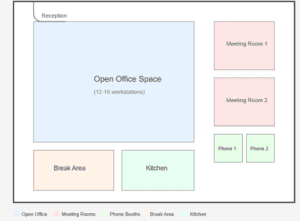
This configuration outlines the space requirements for a small team of 10 to 25 individuals.
- Total Space: 1,500-3,000 square feet (sq ft) – This represents the total area needed to accommodate the team, including workstations, meeting spaces, and collaborative areas. The range reflects variations in individual workspace needs and desired amenities.
- Open Space Configuration: 60% – This indicates that approximately 60% of the total space should be dedicated to an open-plan office environment, facilitating collaboration and communication.
- Meeting Rooms: 2-3 – The suggested number of meeting rooms allows for various meeting sizes and scheduling flexibility.
- Phone Booths: 2-4 – These private, soundproof enclosures provide quiet spaces for individual phone calls or focused work, minimizing disruptions in the open area.
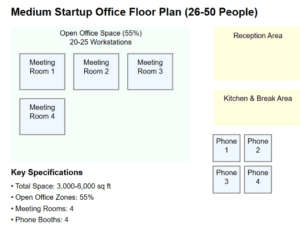
- Medium Team (26-50 people)
Space Optimization Strategies
- Flexible Zoning
- Hot-desking areas
- Activity-based spaces
- Modular furniture systems
- Traffic Flow Management
- Clear circulation paths
- Strategic placement of common areas
- Buffer zones between different work areas
- Growth Accommodation
- Expandable zones
- Movable partitions
- Scalable infrastructure
Creating Collaborative Work Environments
Modern startups thrive on collaboration, making thoughtfully designed meeting spaces crucial for success. Research shows that well-designed shared workspaces can increase team productivity by up to 25% while fostering innovation and strengthening company culture.
Zone Planning Framework
- Primary Collaboration Zones
This document was created to outline our Zone Planning Framework for collaborative workspaces. It details the different types of zones available, specifying their size, capacity, technological features, and primary intended use. The framework categorizes spaces into four primary collaboration zones: Conference Rooms, Meeting Rooms, Phone Booths, and Informal Areas. I believe this information is crucial for optimizing space utilization, promoting effective teamwork, and ensuring a productive work environment. The following sections will provide specific details for each zone type.
| Zone Type | Size | Capacity | Technology | Primary Use |
| Conference Rooms | 200-300 sq ft | 8-12 | Video conferencing | Client meetings |
| Meeting Rooms | 120-180 sq ft | 4-8 | Digital whiteboard | Team collaboration |
| Phone Booths | 25-35 sq ft | 1-2 | Sound isolation | Private calls |
| Informal Areas | 150-200 sq ft | 6-10 | Wireless display | Casual meetings |
- Technology Integration
- Smart booking systems
- Wireless presentation tools
- Acoustic management solutions
- Hybrid meeting capabilities
Success Case Study: Stripe HQ

Stripe’s office design demonstrates effective collaboration space planning:
- 40% dedicated to shared workspaces
- Varied meeting room sizes
- Acoustic private office space solutions
- Tech-enabled boardrooms
Key Implementation Strategies
- Space Distribution
- 1 conference room per 20 employees
- 1 meeting room per 10 employees
- 1 phone booth per 8 employees
- Multiple informal collaboration areas
- Design Considerations
- Clear glass walls for transparency
- Movable furniture for flexibility
- Sound absorption materials
- Natural light integration
Collaboration Space Checklist
□ Booking system implementation
□ Video conferencing setup
□ Acoustic treatment
□ Flexible furniture
□ Power access points
□ Display technology
□ Storage solutions
□ Climate control
Break Areas and Social Spaces
Well-designed social spaces serve as catalysts for innovation and team bonding. Research indicates that companies with thoughtfully designed break rooms experience 32% higher employee satisfaction and 27% better team collaboration.
Social Space Zones
- Primary Relaxation Area
- Living room style setup with comfortable seating
- Natural light optimization
- Acoustic management for comfort
- Multi-purpose furniture arrangements
- Refreshment Hub
- Professional coffee equipment
- Healthy snack stations
- Water and beverage options
- Casual seating arrangements
- Active Recreation
- Ping-pong tables placement
- Gaming stations
- Activity zones
- Flexible event spaces
Design Elements Matrix
My analysis details the primary function of each zone (Café Area, Lounge, Recreation, Multi-use), the specific design elements strategically employed to achieve that function, and the anticipated cultural impact on users. This provides a framework for understanding my holistic design approach and its contribution to the overall user experience.
| Zone Type | Primary Function | Design Elements | Cultural Impact |
| Café Area | Refreshment | Coffee bar setup | Community building |
| Lounge | Relaxation | Living room style | Team bonding |
| Recreation | Activity | Ping-pong tables | Energy boost |
| Multi-use | Events | Modular furniture | Collaboration |
Activity Support Guidelines
These guidelines focus on two key areas: Time Management and Space Utilization. I have detailed effective time management strategies, including short breaks, longer lunch periods, and team events, along with considerations for accommodating various work styles
- Time Management
- Quick breaks (5-15 minutes)
- Lunch periods (30-60 minutes)
- Team events (1-2 hours)
- Different work styles accommodation
- Space Utilization
- 15-20% of total office space
- Multiple smaller zones
- Clear sight lines
- Easy access from work areas
Office Design and Furniture
Creating an effective workspace requires thoughtful selection of office furniture and design elements that promote both productivity and wellbeing. Natural light optimization should be a primary consideration in layout planning.
Ergonomic Design Matrix
The Ergonomic Design Matrix provides a summary of ergonomic requirements, sustainability features, and approximate costs for key furniture types: desks, chairs, and lighting.
- Furniture Type: Specifies the type of office furniture being considered.
- Ergonomic Requirements: Details the essential ergonomic features necessary for promoting comfort and preventing physical strain. These features are crucial for supporting employee health and maximizing productivity.
- Sustainability Features: Highlights environmentally friendly aspects of the furniture, such as the use of recycled materials or low-emission manufacturing processes. This demonstrates a commitment to corporate social responsibility and environmental stewardship.
- Approximate Cost: Provides a cost range for each furniture type, allowing for budgeting and comparison of different options. Prices are subject to variation based on specific features and vendors.
| Furniture Type | Ergonomic Requirements | Sustainability Features | Approximate Cost |
| Desks | Height adjustable | Recycled materials | $400-800 |
| Chairs | Lumbar support | Low-emission | $300-600 |
| Lighting | Anti-glare | Energy efficient | $150-300 |
The overall goal is to guide the selection of office furniture and the design of the workspace to thus create a healthy, productive, and environmentally conscious environment. Optimizing natural light is emphasized as a crucial element in achieving this goal.
Future-Proofing Your Space
Creating an office that stands the test of time requires more than just efficient design, as it demands a long-term commitment to adaptability and innovation. Research shows that companies making strategic workspace investments retain top talent 42% longer than those with traditional office setups.
Adaptability Framework
The core of the strategy revolves around an Adaptability Framework encompassing two key areas:
- Physical Space Flexibility: This section highlights the importance of designing a physical space that can easily adapt to changing needs. Key elements include:
- Modular wall systems: Walls that can be easily reconfigured to alter room layouts.
- Movable furniture solutions: Furniture designed for easy relocation and rearrangement.
- Expandable work zones: Spaces that can be easily enlarged or reduced in size to accommodate fluctuating team needs.
- Pet-friendly accommodations: Provisions for employees who bring pets to work, contributing to a positive work environment.
- Technology Integration Matrix: This section details a plan for integrating technology now and into the future. It uses a matrix to illustrate current needs, potential future expansion, and the level of integration for several key technology types:
- Smart Systems: Currently utilizing basic control systems, future plans involve integrating artificial intelligence (AI), with a high level of integration planned.
- Connectivity: Currently relying on Gigabit fiber, the future includes multi-channel connectivity, considered essential for business operations.
- Security: Current security is cloud-based, with future plans incorporating biometric security for enhanced protection. This is considered a progressive implementation.
- Collaboration: Current collaboration tools are focused on Product Manager tools, while future plans include integrating virtual reality (VR) for enhanced collaborative opportunities. The integration level for collaboration tools is considered moderate.
2. Technology Integration Matrix
This matrix demonstrates a commitment to technological advancement, ensuring the office remains efficient and competitive. The “Integration Level” indicates the prioritization and planned depth of integration for each technology. “High” suggests comprehensive integration, “Essential” signifies critical importance to business operations, “Progressive” denotes a phased implementation, and “Moderate” represents a balanced approach.
| Technology Type | Current Need | Future Expansion | Integration Level |
| Smart Systems | Basic control | Artificial intelligence | High |
| Connectivity | Gigabit fiber | Multi-channel | Essential |
| Security | Cloud-based | Biometric | Progressive |
| Collaboration | Product Manager tools | Virtual reality | Moderate |
Growth Planning Guidelines
These guidelines outline key considerations for planning future growth, encompassing both physical space and technological infrastructure. They are designed to ensure adaptable and sustainable expansion to accommodate anticipated increases in personnel and operational needs.
- Space Utilization: This section focuses on optimizing existing space and planning for future expansion to maximize efficiency and accommodate growth.
- 20% growth buffer: A 20% allowance of extra space is recommended to accommodate future expansion without requiring immediate, costly relocations.
- Flexible desk arrangements: The use of adaptable furniture and layouts allows for easy reconfiguration to meet changing needs.
- Expandable meeting areas: Meeting rooms should be designed with expandability in mind to accommodate larger gatherings or varied meeting styles.
- Adaptable common spaces: Common areas like break rooms and collaboration spaces should be designed to be versatile and easily modified as needed.
- Infrastructure Considerations: This section emphasizes on building a robust and scalable infrastructure that can support significant growth.
- Scalable power systems: The electrical system should be capable of easily handling increased power demands.
- Future-ready networking: The network infrastructure should be future-proofed, supporting higher bandwidth and increased numbers of connected devices.
- Modular HVAC: A modular HVAC system allows for easier expansion and adjustments to climate control as the space changes.
- Sustainable materials: The use of sustainable materials reflects a commitment to environmental responsibility and long-term cost savings.
Technology Integration Roadmap:
- Current state implementation: Refers to the existing technology implementation and its current functionality.
- 6-month optimization: A six-month plan focusing on optimizing current technologies for enhanced efficiency and performance.
- 12-month expansion: A twelve-month plan for expanding existing technology infrastructure to support increased user base and operational needs.
- 24-month innovation integration: A two-year plan for integrating new and innovative technologies to advance operations and capabilities.
Budget Planning
Effective budget planning is crucial for startup success, with Business Insider reporting that 82% of Small Business failures are linked to cash flow issues. Understanding both obvious and hidden costs ensures better financial preparation.
Initial Cost Breakdown
This section details the significant initial investment required, expressed as a percentage of the total startup budget. Note that these are ranges, reflecting the variability inherent in different business setups.
- Core Expenses: These are the fundamental costs necessary to establish the business. The percentages provided offer a guideline for allocation.
- Base Rent/Lease (45-50%): The largest expense, highlighting the significant investment in physical workspace.
- Build-out (15-20%): Costs associated with adapting the space to the business’s needs (e.g., renovations, installations).
- Furniture (12-15%): Furnishing the workspace appropriately.
- Technology (10-12%): Initial investment in hardware and software.
- Professional Services (8-10%): Costs incurred for legal, accounting, consulting, etc.
Hidden Cost Analysis
- Move-in ready offices Additional Expenses:
- Security deposits (1-3 months rent)
- Insurance requirements ($2-5K annually)
- Utility setup fees ($500-2K)
- Moving costs ($2-10K)
- IT infrastructure ($5-15K)
- Operational Considerations:
- Maintenance reserves (5% of rent)
- Common area charges (10-15% of base rent)
- Utility fluctuations (±20% seasonal)
- Insurance increases (3-5% annual)
- Technology upgrades (10% annual)
Budget Planning Matrix
This matrix provides projected budget growth over three years for different expense categories. The growth percentages account for inflation and anticipated increases in operational needs.
- Base Costs: The core expenses are expected to increase moderately due to inflation and potential lease renegotiations.
- Operations: Operational costs, including utilities and supplies, are projected to increase slightly more than base costs.
- Maintenance: Maintenance expenses are expected to increase more significantly over time due to wear and tear and potential equipment failures.
- Technology: Technology upgrades and replacements are anticipated to be a significant recurring cost, with higher growth projections reflecting technological advancements and potential obsolescence.
| Expense Category | Year 1 | Year 2 | Year 3 |
| Base Costs | 100% | +3-5% | +3-5% |
| Operations | 100% | +5-7% | +5-7% |
| Maintenance | 100% | +8-10% | +10-12% |
| Technology | 100% | +10-15% | +15-20% |
Conclusion
This article details the comprehensive approach I developed to navigate this process, offering founders like myself a smoother, more confident path to creating the perfect workspace.
Key Takeaways:
- Location selection: Choose an office space that aligns with your business goals, budget, and growth potential.
- Layout and design: Create a functional, inspiring workspace that promotes productivity and collaboration.
- Budgeting: Develop a comprehensive financial plan that accounts for both immediate and long-term expenses.
- Technology and systems: Establish a reliable IT infrastructure and implement effective communication and security protocols.
- Maintenance and future-proofing: Regularly assess and adapt your office to support your startup’s evolving needs.
Action Steps for Startup Founders:
- Conduct thorough research on potential office locations and leasing options.
- Involve your team in the design process to create a space that reflects your startup’s culture and values.
- Develop a detailed budget that factors in all costs associated with setting up and maintaining your office.
- Invest in scalable, flexible technology solutions that can grow with your business.
- Foster a culture of adaptability and continuous improvement to ensure your office remains optimized for success.
By approaching the startup office setup process with a strategic and meticulously informed mindset, founders can establish the foundation for a thriving and productive workspace that effectively supports their company’s long-term growth and overall success.